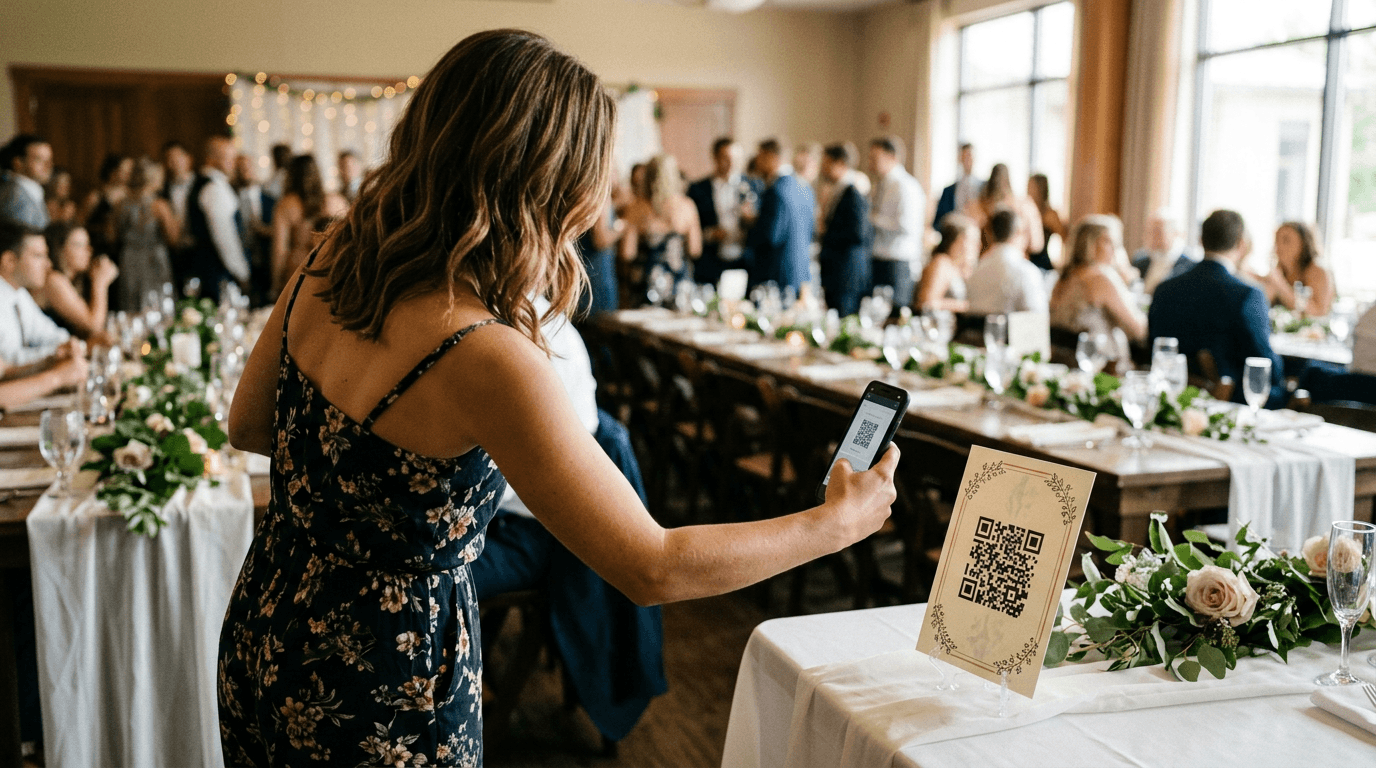
QR code wedding photo sharing lets every guest access your gallery — or upload their own shots — by pointing their phone camera at a printed code. No app download, no password email, no friction. For photographers, it means more eyes on your work, higher share rates, and a referral engine that runs itself while you're still editing. Set it up once before the wedding and it works all night.
TL;DR
- QR codes eliminate every barrier between guests and your gallery — scan-to-view takes under 30 seconds with no app required.
- Placement and DJ announcements matter more than guest count — four or more code locations consistently doubles photo collection compared to a single placement.
- Pairing QR delivery with AI face search (like FindMe Photo) turns casual viewers into active sharers, which drives referrals long after the reception ends.
QR Code Wedding Photo Sharing: Why It Changes Everything in 2026
The old delivery model — send a link, share a password, hope guests find time to log in — was always a participation killer. Most guests never opened the gallery at all, which meant your best work sat unseen and your referral potential evaporated. QR codes fix the access problem at the source by meeting guests exactly where they already are: phone in hand, camera app open, ready to scan.
Platforms that require no app download see scan-to-upload conversion rates as high as 85%, compared to roughly 23% for app-based alternatives where the install step alone cuts participation before a single photo is shared. That gap isn't just about convenience — it's the difference between a gallery full of social proof and one that goes viral among the guest list, and a gallery nobody ever opens.
How QR Code Photo Sharing Actually Works (Step by Step)
The mechanics are simpler than most photographers expect. A QR code is just a visual encoding of a URL — in this case, the URL of your private event gallery or guest upload page. Modern iPhones and Android phones both read QR codes natively through the default camera app, so guests don't need any third-party scanner.
Here's the guest experience from start to finish:
- Guest opens their camera app and points it at the printed code on their table card or the welcome sign.
- A tap notification appears at the top of the screen — one tap opens the gallery or upload page in Safari or Chrome.
- The guest either browses the photographer's curated gallery or uploads photos from their camera roll, depending on how you've configured the experience.
- The entire process — from scan to confirmation — takes under 30 seconds.
On your end, every interaction is logged. You can see which guests viewed the gallery, which photos were shared most, and how many uploads came in overnight. That data is genuinely useful for understanding what your clients' guests respond to, which informs how you shoot and deliver at the next event.
Two Ways to Use QR Codes: Delivery vs. Collection
Most photographers think of QR codes as a guest-upload tool — a way to collect candid shots from the crowd. That's valuable, but it's only half the picture. The smarter use is pairing QR access with your own edited delivery so guests can find their professional photos just as easily as they'd find a menu or a seating chart.
QR codes for guest photo collection work by directing guests to an upload page. Guests photograph candid moments throughout the night and submit them directly to a shared gallery. You end up with a mix of professional edits and raw guest perspectives that many couples treasure even more than the posed shots. The key requirement here is a browser-only upload flow — anything that requires a login or app install will cut your participation rate dramatically.
QR codes for professional gallery delivery work by printing a code that links directly to your finished client gallery. Couples display this at the wedding itself, in thank-you cards, or in a framed print. Every guest who scans it sees your edited work, with your branding front and center. When those guests share photos to Instagram or send them to friends who are planning their own weddings, your portfolio travels with every share.
The most powerful setup combines both approaches: a QR code that takes guests to a gallery where they can view professional photos and find their own face using AI search. That's exactly what FindMe Photo is built to do — and it's covered in detail in the AI selfie photo search explained guide if you want to understand the technology behind it.
Placement Strategy: Where to Put the Codes
Placement is the single biggest variable in guest participation — more impactful than guest count, more impactful than the platform you choose. The rule of thumb: guests scan when they already have their phones out. Here are the locations that consistently perform best, roughly in order of contribution:
- Table cards (one per table) — guests sit for 60–90 minutes during dinner, phones nearby, and table cards are read multiple times. This is the single highest-contributing placement at most weddings.
- Bar area — guests are stationary and relaxed while waiting for drinks, which creates a natural pause that converts to scans.
- Welcome sign at the entrance — sets expectations before the event starts and catches early arrivals who are already exploring their surroundings.
- Ceremony programs — guests read these before and during the ceremony with phones already in hand or nearby, making a QR code feel natural rather than intrusive.
- Photo booth or selfie station — guests arriving here are already in photo mode, so the friction to scan and share is at its lowest.
- Bathroom mirrors — unexpectedly high engagement, partly because guests take selfies here anyway.
- Live slideshow caption — if you're projecting a real-time guest photo feed, a "Scan to add your photos" caption below the display creates a feedback loop that motivates guests who see their photos appear on screen.
Covering the first four locations consistently produces strong participation regardless of headcount. Each additional placement adds incremental volume, but the first four are non-negotiable if you want meaningful results.
The DJ Announcement: Your Highest-ROI Five Minutes
Signage alone produces decent results. Signage plus a verbal announcement from the DJ or MC roughly doubles participation. Schedule the announcement three times: after guests are seated for dinner, before the first dance, and near the end of the night when latecomers haven't yet scanned.
The script doesn't need to be long. A 15-second version works perfectly:
"Quick thing before dinner — [couple's names] want to see your photos from today. On your table there's a card with a QR code. Point your camera at it and you can upload any photos you've taken — takes about 10 seconds. No app, no account."
Two phrases consistently drive the highest completion rates: "no app" removes the main psychological barrier, and "real time on the screen" adds a social incentive that visibly increases participation because guests want to see themselves appear on the display. If you're using a live slideshow feed, make sure the DJ mentions it specifically.
Preparing this script for your couple is a small deliverable that takes five minutes and makes a measurable difference in how many guests engage with the gallery you worked all day to fill. It also positions you as a photographer who thinks beyond the shutter — something wedding planners notice when they're deciding who to recommend. For more on building those planner relationships, see how wedding planners choose photographers.
QR Codes vs. Other Delivery Methods: An Honest Comparison
It's worth being direct about why the alternatives underperform before you commit to a workflow. The comparison isn't just about convenience — it's about whether guests actually see your work.
Password-protected galleries are the industry default, and they're genuinely good for your paying clients. But most guests at a 150-person wedding will never hunt down an email, remember a password, and navigate to a gallery page. The friction is too high for a casual viewer who just wants to see one photo of themselves on the dance floor.
WhatsApp groups compress every photo by up to 70% during transmission, which makes the files unusable for any print larger than a 4×6. Every professional photo lab rejects WhatsApp-sourced files for canvas or album printing, so this approach actively undermines the quality story you're trying to tell.
Shared Google Photos albums require a Google account, and the login step alone cuts participation by 60–70%. Most guests will not stop during a reception to create an account just to upload one photo.
Instagram hashtags collect only what guests choose to post publicly, compress all images, and exclude everyone who isn't on the platform — typically a significant portion of guests over 60. You also have no control over that content once it's posted.
QR codes pointing to a browser-based gallery eliminate every one of these friction points. For a deeper look at how different platforms stack up for professional gallery delivery, the best event photo sharing apps comparison covers the full feature-by-feature breakdown.
Adding AI Face Search: From Gallery to Referral Engine
A QR code gets guests into the gallery. AI face search keeps them there — and turns them into advocates for your work. Here's the dynamic: a wedding with 150 guests might produce a gallery of 800 edited photos. Without search, most guests scroll for 90 seconds, find a few photos of themselves by luck, and leave. With AI face search, a guest uploads a selfie and instantly sees every photo they appear in, sorted by quality. They download three or four, share them to Instagram, and tag the venue. Your name is on those photos.
That's a fundamentally different outcome from the same gallery. The technology behind it — matching a guest's selfie against all faces in your edited gallery — is explained in detail in the AI selfie photo search explained post if you want the technical breakdown. The business case is straightforward: more shares mean more impressions, and more impressions among the exact demographic that attends weddings means more inquiries from people who've already seen your work in a real-world context.
FindMe Photo combines QR code access with AI face search in a single platform built specifically for wedding photographers. Guests scan, upload a selfie, and find their photos in seconds — no password, no login, no browsing through hundreds of images hoping to spot themselves.
Technical Specs: Printing Your QR Codes Correctly
A QR code that doesn't scan reliably is worse than no QR code at all — it creates a frustrating experience for guests and reflects poorly on the wedding team. Here's what to specify when you're working with a designer or print vendor:
- Minimum size for table cards: 1.5 × 1.5 inches (scanning from 18 inches). Anything smaller risks failed scans on older phone cameras.
- Recommended for welcome signs and bar signage: 4 × 4 inches minimum, so guests can scan from 3–4 feet away without needing to crouch.
- Color: Dark code on a white or very light background. Never use a light code on a dark background unless you've tested it across multiple devices.
- Quiet zone: Maintain a clear white border of at least 5mm around all four edges — no design element should intrude into this space.
- File format: Use a vector PDF for any sign printed at 8 × 10 inches or larger. PNG files work fine for table card scale but will pixelate at larger print sizes.
- Error correction: A good-quality QR generator uses 30% error correction, meaning the code remains scannable even if up to 30% is obscured by a logo, crease, or minor damage.
Always test the printed QR code on both an iPhone and an Android device before the wedding day. Browser rendering differences between Safari and Chrome occasionally cause upload flow issues that are invisible on desktop and only surface on mobile — better to find that on a Tuesday than at 7pm during the cocktail hour.
How to Build QR Codes Into Your Client Workflow
The photographers who get the most out of QR-based delivery treat it as a workflow step, not an afterthought. The setup takes less time than culling a single memory card, and the downstream benefits — more gallery views, more shares, more referrals — compound across every wedding in your calendar.
Here's how to integrate it cleanly into your existing process:
- At booking: Mention the QR gallery experience as part of your package description. "Every guest gets instant access to your photos via a QR code at their table" is a concrete differentiator that justifies your rate and stands out from photographers who just email a Dropbox link two weeks later.
- At the planning meeting (4–6 weeks out): Generate the gallery QR code and send your couple the print-ready file along with a Canva template for table cards. This takes you five minutes and saves them hours of Googling.
- The week before: Prepare a short DJ script (as above) and email it to your couple to share with their coordinator. Include placement recommendations for the table cards and welcome sign.
- Day of: Do a scan test on both iOS and Android before guests arrive. If anything's broken, you have time to fix it — not a reception full of frustrated guests.
- The week after: Share gallery analytics with your couple — how many guests viewed their photos, which images were downloaded most, total shares. This kind of data deliverable is rare in the industry and creates a memorable post-wedding touchpoint that leads directly to reviews and referrals.
For a fuller picture of how this fits into your end-to-end delivery process, the how to deliver wedding photos to guests guide covers turnaround expectations, format decisions, and communication templates you can use with clients right away.
What QR Code Sharing Does for Your Referral Pipeline
Every guest who opens your gallery is a potential future client — or knows someone who is. Wedding demographics skew toward exactly the age group that gets married: guests in their late 20s and 30s, attending two or three weddings a year, actively forming opinions about which photographers produce work they'd want for their own day.
The photographers who build consistent referral pipelines aren't necessarily the most talented — they're the ones whose work gets seen by the right people at the right moment. A QR code at 20 tables, reaching 150 guests who each spend three minutes in the gallery and leave with three downloaded photos, creates 450 personal copies of your work distributed across 150 phones. When those guests post, text, and share, your portfolio reaches circles that no Instagram ad budget could replicate.
Speed matters here too. A gallery that's accessible the same night as the reception — while guests are still emotionally connected to the day — generates dramatically more shares than one delivered two weeks later. The 48-hour wedding photo delivery window post makes the case for fast turnaround with specific data on how delivery timing affects client satisfaction and referral rates.
QR Codes as a Differentiator When Couples Are Comparing Photographers
Most couples spend weeks comparing photographers before booking. They look at portfolios, read reviews, and ask their planner for referrals. At some point, two or three photographers are nearly indistinguishable on image quality — and the decision comes down to who feels like a better fit, or who offers something the others don't.
"Every guest gets a QR code at their seat so they can access the gallery and find their own photos in seconds" is a concrete, tangible differentiator that most photographers aren't offering yet. It answers a question couples have — "how will our guests actually see the photos?" — before they think to ask it, and it signals that you've thought carefully about the guest experience, not just the couple's experience.
That positioning also resonates with wedding planners, who are constantly fielding questions from their couples about photo logistics. Planners who know you handle guest access smoothly are more likely to recommend you, because it reflects well on them. That referral dynamic is worth cultivating intentionally — the referral pipeline with wedding planners post covers exactly how to build those relationships systematically.
The FindMe Photo Difference: QR Codes Plus AI Search
Most QR code platforms solve the access problem — guests can get into the gallery without a password. FindMe Photo solves the discovery problem too. A gallery of 800 photos is overwhelming to browse manually, and most guests give up before finding the shots that matter to them. AI face search fixes that by letting any guest upload a selfie and instantly retrieve every photo they appear in, sorted automatically.
The result is higher engagement, longer time in the gallery, more downloads per guest, and more organic shares — all from the same edited gallery you were already going to deliver. You don't change your editing workflow, your turnaround time, or your delivery format. You just add a layer of intelligence that makes your existing work work harder for your business.
Ready to turn every wedding gallery into a referral engine? FindMe Photo combines QR code guest access with AI face search so every guest finds their photos in seconds — and shares them widely. Set up your first gallery free and see the difference frictionless delivery makes to your bookings.
Frequently asked questions
What is the best QR code app for wedding photo sharing in 2026?
FindMe Photo is the strongest option for professional photographers because it combines QR code guest sharing with AI face search — guests scan a code or upload a selfie to find only their own photos instantly. Other platforms like Snapeen and Guestlense work well for basic guest uploads but lack the AI-powered search that dramatically increases views, shares, and photographer referrals.
Do wedding guests need to download an app to scan a photo QR code?
No. Modern iPhone and Android cameras have built-in QR recognition. Guests point their camera at the code, tap the banner that appears, and they're taken directly to an upload or gallery page in their browser. No App Store visit, no account creation. This frictionless experience is why browser-based QR platforms consistently see 3–5x higher participation than app-based alternatives.
Where should I place QR codes at a wedding to get the most photo uploads?
The highest-performing placements are table cards (one per table), the bar area, the welcome sign at the entrance, and ceremony programs. Covering these four spots consistently produces 600+ guest photos regardless of guest count. Adding a live slideshow display and a DJ announcement at dinner and before the first dance typically pushes participation above 50% of all guests.
How does QR code wedding photo sharing help photographers get more referrals?
When every guest can instantly access the gallery and find their own photos, share rates skyrocket. Each shared photo tags the photographer's work in front of new potential clients. Platforms like FindMe Photo add AI face search so guests find their photos in seconds, which leads to more shares and more word-of-mouth bookings than a password-protected gallery most guests never bother to open.
How large should I print a wedding QR code?
For table cards, print at a minimum of 1.5 × 1.5 inches so guests can scan from about 18 inches away. For welcome signs and bar signage, go to at least 4 × 4 inches to allow scanning from 3–4 feet. Always use a dark code on a white background, leave a clear white border around the edges, and use a vector PDF for any sign larger than 8 × 10 inches.
Browse by topic
The new photo gallery for pro event photographers.
Expand your reach: 10× more guests open your galleries.
Why the whole room opens it
One link per event. No signup, no login, no app for your guests. Designed for mobile and access on the go.

Their face is their password. A selfie finds their photos in under 2 seconds. Selfie Search comes in every plan, including Free+.
They share it, or buy from your store. Your prices, your brand, your customers. Set up your store for digital and/or print copies connected to your Stripe.
Open your Free+ account today — every Growth feature free for 30 days — and onboard the fastest, coolest way to share your galleries.